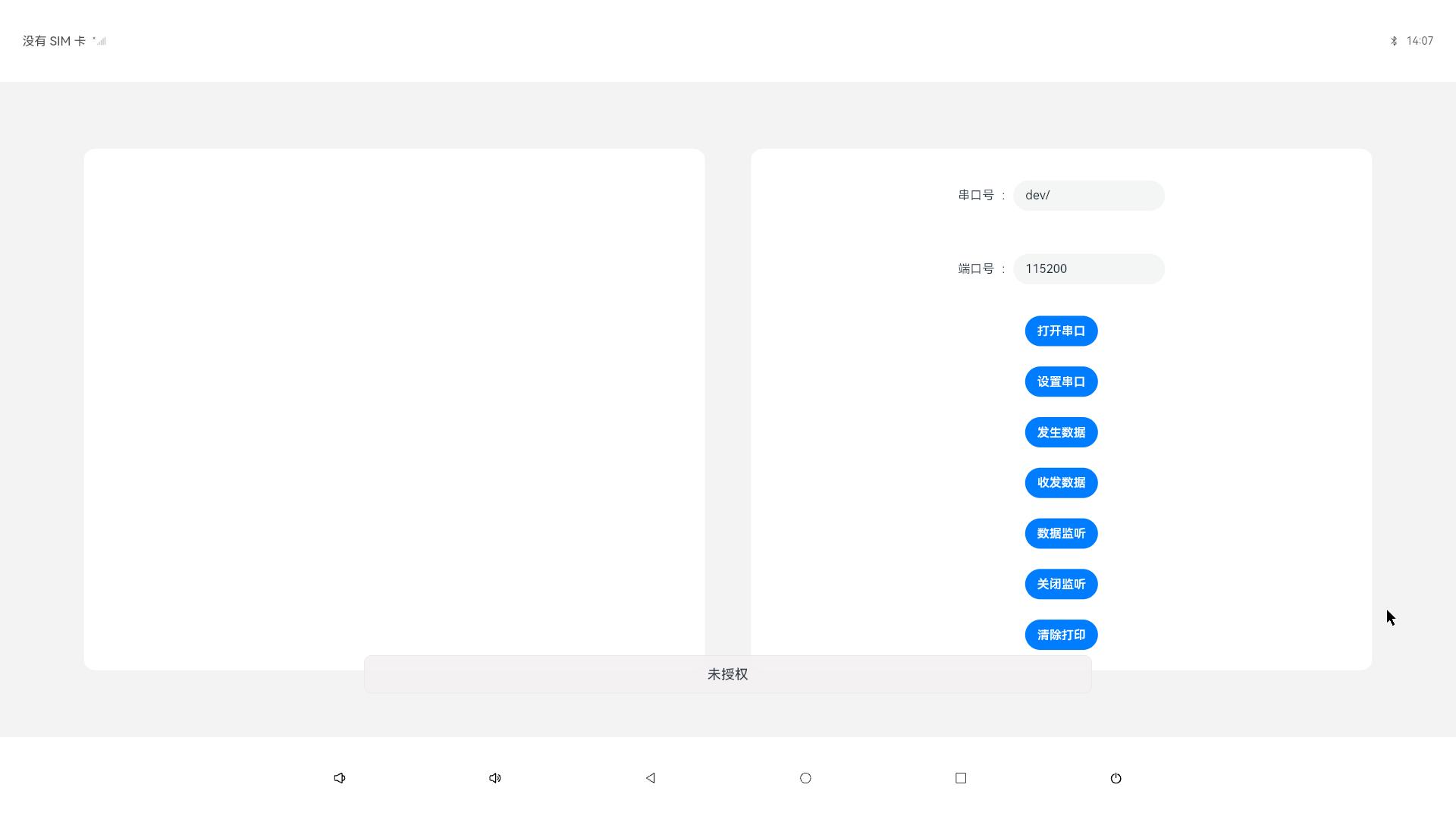
UART-485-232
1. 简介
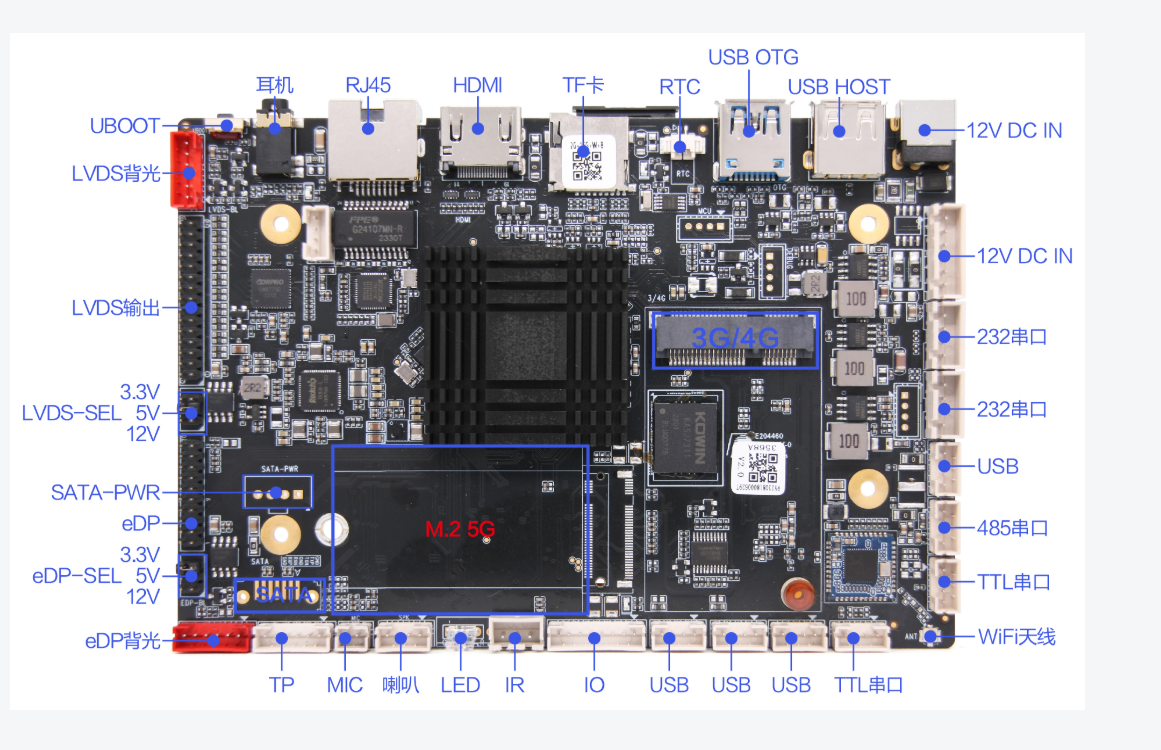
AIOT-3568A设有R232和485模块,可以通过SO库去调用开启,发送,接受监听数据等功能。 下图介绍R232以及485的位置以及图像介绍
2. HDC相关指令
查询 R232 信息
hdc命令:
cat dev/ttyS
3. 标准API使用方法
备注
串口实现不借助API,调用SO库实现串口通信。
4. 社区Demo
- 简介
为了帮助开发者更快速的使用板子开发和学习,我们在gitee上提供了示例实现串口短接收发、设备间收发、信息监听功能。,每一个项目都是独立的DevEco Studio工程,开发者可以将工程导入到DevEco Studio中即可,通过浏览代码、编译工程、安装和运行应用示例来了解应用示例中涉及API的使用方法。
- Demo主要实现源码
- RX232.ets
  1        import native_serialport from 'libnative_serialport.so'
  2        import { Module, FunctionItem } from "../widget/Base"
  3        import { BusinessError } from '@ohos.base';
  4        import Logger from '../widget/Logger';
  5
  6        @Entry
  7        @Component
  8        struct Index {
  9        @State message: string = '串口接受数据'
 10        private TAG: string = 'serialTools'
 11        //@State message: string = 'Hello World'
 12        @State speedValue: number = 115200;
 13        @State COM_DEV_TTY: string = 'dev/'+''
 14        @State data: string = ''
 15        modules: Module[] = []
 16        eachModuleWidth: number = 0;
 17
 18        openSerial() {
 19            native_serialport.openSerial(this.COM_DEV_TTY)
 20            Logger.debug(this.TAG, `native_serialport.openSerial succ`)
 21            Logger.debug(this.TAG, `native_serialport.openSerial abc`)
 22        }
 23
 24        setOptions() {
 25            let bits = 8;
 26            let events = 0;
 27            let stops = 1;
 28            native_serialport.setOptions(this.COM_DEV_TTY, this.speedValue, bits, events, stops)
 29            Logger.debug(this.TAG, ` native_serialport.setOptions succ`)
 30            Logger.debug(this.TAG, ` this.COM_DEV_TTY   `  +  this.COM_DEV_TTY);
 31            Logger.debug(this.TAG, ` this.speedValue   `  +  this.speedValue);
 32
 33        }
 34
 35        closeSerial() {
 36            native_serialport.closeSerial(this.COM_DEV_TTY)
 37            Logger.debug(this.TAG, `native_serialport.closeSerial succ`)
 38            Logger.debug(this.TAG, ` this.COM_DEV_TTY   `  +  this.COM_DEV_TTY);
 39
 40        }
 41
 42        sendData() {
 43            let data = new Uint8Array([0x01, 0x01, 0x00, 0x0a, 0x01, 0x03, 0x5c, 0x09]);
 44            native_serialport.sendData(this.COM_DEV_TTY, data)
 45            Logger.debug(this.TAG, `native_serialport.sendData succ`)
 46
 47        }
 48
 49        async transmit() {
 50            let min = 10;
 51            let data = new Uint8Array([0x01]);
 52            let str = ""
 53            try {
 54            Logger.debug(this.TAG, ` this.COM_DEV_TTY   `  +  this.COM_DEV_TTY);
 55            let d: string = await native_serialport.transmit(this.COM_DEV_TTY, data, 1, min);
 56            // Logger.debug(this.TAG, ` this.COM_DEV_TTY   `  +  this.COM_DEV_TTY);
 57            Logger.debug(this.TAG, `native_serialport transmit type:${typeof d}`)
 58            for (let i = 0; i < d.length; i++) {
 59                str = str + d[i] + ','; // String.fromCharCode(data[i]);
 60                this.data = this.data + '\n' + str;
 61            }
 62            // str = str.substring(2, str.length - 2);
 63            // str = this.hexToString(str);
 64            } catch (e) {
 65            Logger.error(this.TAG, `native_serialport transmit catch:${JSON.stringify(e)}`)
 66            }
 67            Logger.debug(this.TAG, `native_serialport transmit recv data:${str}`)
 68        }
 69
 70        on() {
 71            native_serialport.on(this.COM_DEV_TTY, (data: Uint8Array) => {
 72            Logger.debug(this.TAG,` serialport.on ttyS7 recv length:${data.length}`)
 73            let str = ""
 74            for (let i = 0; i < data.length; i++) {
 75                // String.fromCharCode(data[i]);
 76                str = str + data[i].toString(16).padStart(2, '0') + ','; //String.fromCharCode(data[i]);
 77                if (i % 100 == 99) {
 78                Logger.debug(this.TAG, `serial ttyS7 recv:${str}`)
 79                str = "";
 80                }
 81            }
 82            // str = str.substring(2, str.length - 2);
 83            // str = this.hexToString(str);
 84            Logger.debug(this.TAG, `serial ttyS7 recv:${str}`)
 85            this.data = this.data + '\n' + str;
 86            Logger.debug(this.TAG, `serial ttyS7 recv:  this.data  :` + this.data)
 87            })
 88            Logger.debug(this.TAG, ` native_serialport.on ...`)
 89        }
 90
 91        off() {
 92            native_serialport.off(this.COM_DEV_TTY)
 93            Logger.debug(` native_serialport off()`)
 94        }
 95
 96        hexToString(hex : string) {
 97            let  string = '';
 98            for (let  i = 0; i < hex.length; i += 2) {
 99            string += String.fromCharCode(parseInt(hex.substr(i, 2), 16));
100            }
101            return string;
102        }
103
104        build() {
105            Row() {
106            Scroll() {
107                Column() {
108                Text(this.data)
109                    .fontSize(25)
110                    .fontWeight(FontWeight.Bold)
111                }
112                .width('45%')
113                .height('90%')
114                .borderRadius(15)
115                .backgroundColor(Color.White)
116                .alignItems(HorizontalAlign.Center)
117                .justifyContent(FlexAlign.SpaceEvenly)
118            }
119            Column() {
120                Row() {
121                Text('串口号  :')
122                TextInput({ text: this.COM_DEV_TTY })
123                    .width(200)
124                    .onChange((value: string) => {
125                    this.COM_DEV_TTY = value;
126                    Logger.debug(this.TAG, 'this.COM_DEV_TTY :' + this.COM_DEV_TTY);
127                    })
128                }.padding(15)
129
130                Row() {
131                Text('端口号  :')
132                TextInput({ text: this.speedValue.toString() })
133                    .width(200)
134                    .onChange((value: string) => {
135                    this.speedValue = Number(value);
136                    Logger.debug(this.TAG, 'this.speedValue :' + this.speedValue);
137                    })
138                }.padding(15)
139                Button('打开串口')
140                    .onClick(() => {
141                    this.openSerial();
142                    })
143                Button('设置串口')
144                    .onClick(() => {
145                    this.setOptions();
146                    })
147                Button('发生数据')
148                    .onClick(() => {
149                    this.sendData();
150                    })
151                Button('收发数据')
152                .onClick(() => {
153                    this.transmit();
154                    Logger.debug(this.TAG,'transmit  :' +this.COM_DEV_TTY )
155
156                })
157
158                Button('数据监听')
159                    .onClick(() => {
160                    this.on();
161                    })
162                Button('关闭监听')
163                .onClick(() => {
164                    this.off();
165                    Logger.debug(this.TAG,'transmit  :' +this.COM_DEV_TTY )
166
167                })
168                Button('清除打印')
169                .onClick(() => {
170                    this.data = ''
171                })
172            }
173            .width('45%')
174            .height('90%')
175            .borderRadius(15)
176            .backgroundColor(Color.White)
177            .alignItems(HorizontalAlign.Center)
178            .justifyContent(FlexAlign.SpaceEvenly)
179            }
180            .justifyContent(FlexAlign.SpaceEvenly)
181            .padding(50)
182            .backgroundColor($r('app.color.main_bg'))
183            .height('100%')
184            .width('100%')
185            }
186        }
5. 代码编译
小技巧
代码编译详细流程可见,Hello World应用以及部署 中的第二部分(构建第一个页面部分内容)